
Organizations are rethinking their virtualization strategy. Some are looking for greater control over infrastructure costs. Others want to reduce their dependency on a single vendor, modernize their private cloud operations, or build a more open foundation for edge, sovereign cloud, and hybrid cloud use cases.
For many of them, VMware has been the operational backbone for years. That means migration cannot be treated as a simple format conversion exercise. It is not just about moving a disk image from one hypervisor to another. It is about preserving service continuity, validating workload behavior, preparing operations teams, and defining a repeatable path that can scale from a few pilot virtual machines to hundreds or thousands of production workloads.
This is where OpenNebula provides a differentiated approach. OpenNebula enables organizations to move VMware workloads to a KVM-based cloud infrastructure managed by OpenNebula, combining migration tooling, operational methodology, technical validation, and expert guidance. The goal is not to force a risky “big bang” migration, but to help customers and partners build a controlled migration path, execute it in phases, and validate each step before moving forward.
The OpenNebula Migration Methodology
A VMware migration project should not start with mass conversion of virtual machines. It should start with a clear migration path.
The OpenNebula approach is based on preparation, validation, and controlled execution. In practice, this is rarely a single-pass process. Most migrations require several rounds: an initial assessment, one or more pilot migrations, procedure adjustments, additional validation, and then migration waves for selected groups of workloads.
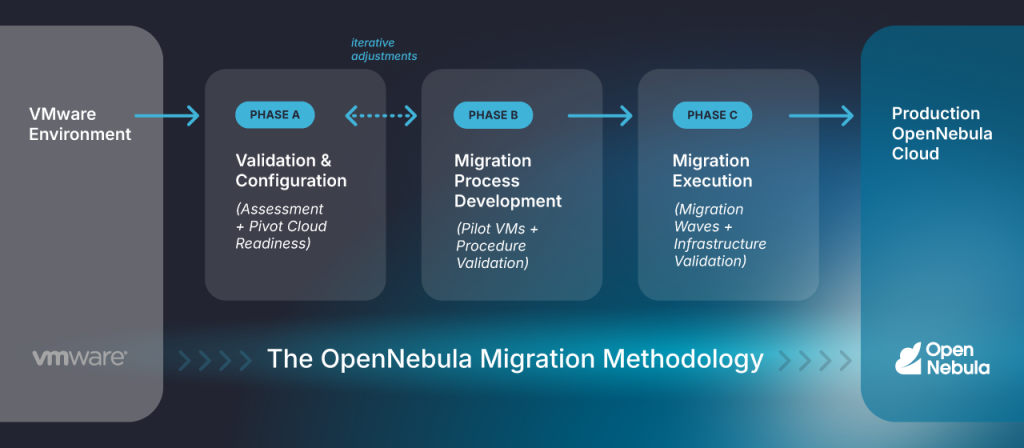
Phase A: Validation and Configuration
The first step is to validate the source VMware environment and prepare the OpenNebula target cloud. This includes reviewing migration requirements, assessing available compute, network, and storage resources, and confirming that the OpenNebula infrastructure is ready to host the migrated workloads.
A common practice is to begin with a pivot OpenNebula cloud rather than the full production deployment. This pivot cloud allows customers and partners to validate the target architecture, test migration tooling and procedures, assess workload compatibility, and gain operational experience before moving to larger migration waves.
The goal of this phase is simple: make sure the target KVM-based cloud, managed by OpenNebula, is correctly configured before production workloads are moved. Compute capacity, virtual networking, datastore configuration, connectivity to vCenter, and performance expectations should all be reviewed early.
Phase B: Migration Process Development
Once the environment is ready, the next step is to validate the migration process itself. Representative VMs are selected as pilots, usually covering the main operating system families and workload types in the environment. These pilot migrations are used to confirm the conversion process, identify guest OS adjustments, validate performance, document the procedure, and define the best approach for larger migration waves.
This pilot-first approach is important. A Windows Server VM, a Linux appliance, a network function, and a business-critical application server may each require different handling. The goal is to avoid discovering those differences during a production cutover.
Phase C: Migration Execution
After the migration procedure has been validated, the customer or partner can execute the broader migration plan in controlled waves. Each wave typically includes VM preparation, image conversion, transfer of images and metadata, creation of the corresponding OpenNebula resources, network mapping, KVM reconfiguration, boot validation, and post-migration checks.
The migration does not always need to cover the entire VMware estate. Some customers may choose a partial approach, moving selected workloads first while keeping legacy or lower-priority systems on VMware until they are retired or modernized.
This phase focuses on the technical migration of the VM and infrastructure-level validation. Application validation remains the responsibility of the customer or partner, since it requires knowledge of the application architecture, dependencies, licensing, and expected behavior.
Available Migration Tooling
OpenNebula provides a practical set of migration tooling for VMware environments.
OneSwap supports multiple migration and transfer approaches, allowing teams to choose the right method depending on the source environment, performance expectations, and access constraints.
OneSwap has shown strong field results. It has been used in real migration projects with a 90% success rate in automatically converting VMs, helping reduce manual effort and accelerate VMware-to-OpenNebula transitions. This figure should be understood as a field-experience metric, not a guaranteed outcome for every environment, since results depend on guest OS versions, VM configuration, storage, networking, and application-specific constraints.
The most common question in any migration project is also one of the hardest to answer generically: how long does it take to migrate a VM? The answer depends on a wide range of technical and operational factors, including source vCenter performance, conversion server capacity, storage throughput, network bandwidth, VM disk size, guest operating system, application characteristics, VM power state, snapshot configuration, the degree of parallelism, the available maintenance window, and the scope of post-migration validation.
As a practical reference, in an OpenNebula lab environment, a Microsoft Windows Server 2022 VM with a 20 GB disk was converted in approximately 12 minutes using a 1 Gbps network backbone and local storage. It is also worth noting that OpenNebula supports delta migrations. In this approach, most of the VM data is transferred while the source VM remains online and operational. Once the initial synchronization is complete, the VM is briefly powered off and only the disk blocks that have changed since the last synchronization are copied. This significantly reduces the amount of data transferred during the cutover phase and can reduce service downtime from hours to just a few minutes, depending on workload characteristics and change rates.
The OneSwap documented transfer methods include:
- Hybrid transfer, which downloads the image locally before importing it into OpenNebula.
- VDDK-based transfer, using VMware’s Virtual Disk Development Kit.
- ESXi direct SSH transfer, copying disks through SSH from the ESXi host.
- vCenter API transfer, which is available but documented as the slowest option.
This flexibility is useful because migration projects rarely have perfect conditions. Some environments may allow direct access to ESXi hosts. Others may require vCenter API-based workflows. Some may benefit from VDDK for transfer performance. Others may need fallback procedures for special cases.
OpenNebula also provides tooling to manage OVAs and VMDKs. This enables teams to import OVA files or OVF folders exported from VMware environments, generate OpenNebula VM templates and images, and import standalone VMDK disks as OpenNebula images.
In practice, this means customers can combine several migration patterns within the same project:
- Direct VM migration from vCenter using OneSwap.
- OVA-based migration for exported appliances.
- VMDK-based import for individual disks.
- Pilot migrations for validation.
- Batch migration for scaled execution.
- Delta migration for lower-downtime scenarios.
The result is not a single rigid process, but a toolkit that supports a controlled migration strategy.
About the VMware Migration Support Service
OpenNebula’s VMware Migration Support Service helps customers and partners define, validate, and document their migration path. The service is not designed to be a full migration service, but rather enables customers and partners to gain the necessary skillset to design and retain full autonomy over their migration process. .
The service focuses on readiness assessment, pilot migrations, knowledge transfer, and post-migration support. OpenNebula reviews the source VMware environment and the target OpenNebula cloud, validates prerequisites, identifies pilot candidates, and helps define the initial execution plan.
The pilot phase typically validates the process with representative Linux and Windows virtual machines using OneSwap. OpenNebula then documents the results, prepares migration guidance, and delivers a knowledge transfer session so the customer or partner can continue the broader migration in controlled waves.
When needed, the standard service can be extended through a tailored professional services engagement to cover any required application validation, custom automation, integrations, number of additional migration profiles, workload types, or full production migration waves.
Estimated Time and Associated Costs
Based on OpenNebula’s migration experience, a VMware migration program typically starts with a pivot cloud and a small number of pilot migrations to validate tooling, procedures, and workload compatibility. Once the migration profiles have been identified and tested, production workloads can be moved in successive waves.
Depending on the size and complexity of the environment, the full journey—from assessment and planning to migration and final validation—may range from several weeks for smaller deployments to several months for large enterprise environments.
As an illustrative example, an organization with approximately 250 virtual machines may group its estate into 8–15 migration profiles, covering Linux and Windows application servers, web servers, databases, infrastructure services, virtual appliances, and specialized workloads. The most common profiles often represent 70–80% of the VM population, allowing validated procedures to be reused across multiple migration waves.
For a moderately complex 250-VM environment, the overall program would typically be expected to take two to four months. The duration is driven less by the number of VMs alone and more by the number of migration profiles, testing requirements, total storage volume, application dependencies, and available change windows.
| Environment Size | Typical Duration |
| 50-100 VMs | 4-8 Weeks |
| 100-250 VMs | 2-4 Months |
| 250-1000 VMs | 3-9 Months |
| >1000 VMs | Project dependent |
From a cost perspective, OpenNebula’s standard VMware Migration Support Service provides the starting point for validating the migration path through pilot migrations, documentation, knowledge transfer, and expert guidance. For larger environments, this service can be extended through a tailored professional services engagement covering additional migration profiles, migration waves, and validation activities.
For a 250-VM environment with 8–15 migration profiles, OpenNebula professional services would typically range from approximately €25,000 to €50,000, depending on the scope and level of assistance required.
These costs cover OpenNebula expertise, migration planning, profile validation, migration guidance, and technical support. They do not include the execution effort required to migrate the full VM estate, application testing, customer or partner project management, change-management activities, or infrastructure investments for the target cloud platform.
A Controlled Path to Infrastructure Independence
Moving from VMware to OpenNebula is not just a platform change. It is an opportunity to build a more open, flexible, and cost-effective cloud foundation based on KVM and managed through OpenNebula.
The key is to approach migration with the right model. OpenNebula combines:
- A structured migration methodology,
- VMware-to-OpenNebula migration tooling,
- OneSwap-based automation,
- OVA and VMDK import capabilities,
- Pilot-based validation,
- Professional guidance,
- Customer and partner enablement,
- Post-migration validation support.
This model allows organizations to migrate at their own pace, reduce operational risk, and build the knowledge required to operate their new OpenNebula cloud with confidence. For customers and partners planning their VMware migration strategy, OpenNebula provides more than a destination platform. It provides a practical path to get there.
Move VMware workloads to OpenNebula. Validate your migration setup and take control of your cloud infrastructure.



0 Comments